I’m helping the site: https://swingshoes.dk making a sign-up system for their members.
They have many workshops and social events, that they wish to create on Facebook, since there are many users in there.
But it’s a hassle to go to Facebook and click through the ‘Create event’-wizard every time, considering that those same information has just been inserted manually in another system. Plus also having to find a banner image and write a description that fits Facebook (with a link to the product), etc. etc.
Solution attempt 1: Using Facebooks events API
Facebook apparently closed their Events API in 2014 – and they’re very strict about using their API. Grrr!! Walled gardens!! Grrr!!
Solution attempt 2: Finding vendors with custom API-permissions
I understand that EventBrite has some further API-access, so one could try to go through them to do something automatically. But I can see that it doesn’t allow creation of events.
I’m also kind of glad that this didn’t work, since it would have added complexity to the solution.
Solution attempt 3: Other 3rd party solutions
I also considered Zapier and n8n, but apparently Facebook has disallowed this.
Solution attempt 4: Automated manual process
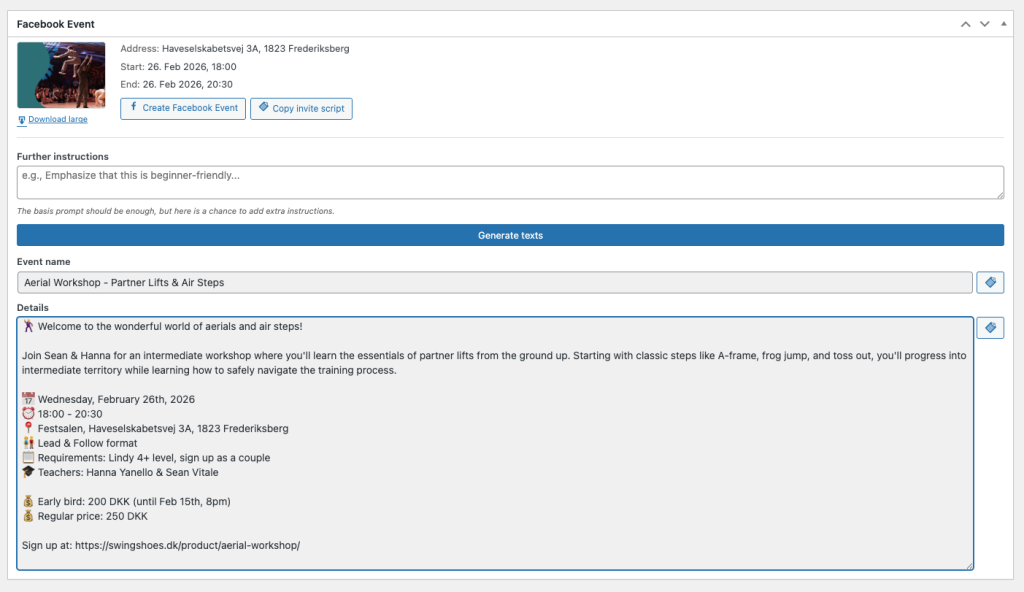
So since Facebook wants to be like this, I figured: “How can I make this manual process as absolutely nice for myself as possible”. So what I did was, that I added a bunch of Claude API-magic to WordPress and added that to a meta-box on the product page. This way, I have all the fields served right there in front of me, so I just have to click a button and copy-paste fields:
I also vibe-coded this script:
(async () => {
  const sleep = ms => new Promise(r => setTimeout(r, ms));
  const TARGET = 500;
  const SKIP = [];
  const PRIORITY_FIRST_NAMES = [
    'Alan',
    'Aleksandra',
    'Øivind'
  ];

  let totalClicked = 0;
  let priorityClicked = 0;
  let randomClicked = 0;
  let skipped = 0;
  let idlePasses = 0;

  const scrollable = [...document.querySelectorAll('div')].find(d => {
    const style = getComputedStyle(d);
    return d.scrollHeight > d.clientHeight + 50
      && d.clientHeight > 200
      && (style.overflowY === 'auto' || style.overflowY === 'scroll');
  });

  if (!scrollable) {
    console.log('Could not find scrollable container. Try scrolling manually.');
  }

  // Helper: get name from a checkbox element
  const getName = (cb) => {
    const nameEl = cb.querySelector('span[dir="auto"] h2 span');
    return nameEl ? nameEl.textContent.trim() : '';
  };

  const getFirstName = (name) => name.split(' ')[0];

  const shouldSkip = (name) => SKIP.some(s => name.toLowerCase() === s.toLowerCase());

  const isPriority = (name) => PRIORITY_FIRST_NAMES.some(
    p => getFirstName(name).toLowerCase() === p.toLowerCase()
  );

  // --- Phase 1: Scroll through everything, selecting priority names ---
  console.log('--- Phase 1: Selecting priority first names ---');
  idlePasses = 0;

  while (idlePasses < 5) {
    const unchecked = document.querySelectorAll('div[role="checkbox"][aria-checked="false"]');
    let clickedThisRound = 0;

    for (const cb of unchecked) {
      const name = getName(cb);
      if (shouldSkip(name)) { skipped++; continue; }

      if (isPriority(name)) {
        cb.click();
        clickedThisRound++;
        totalClicked++;
        priorityClicked++;
        if (clickedThisRound % 5 === 0) await sleep(100);
      }
    }

    if (scrollable) scrollable.scrollTop = scrollable.scrollHeight;

    idlePasses = clickedThisRound === 0 ? idlePasses + 1 : 0;
    console.log(`Phase 1 — Priority selected: ${priorityClicked} | Skipped: ${skipped} (idle: ${idlePasses}/5)`);
    await sleep(1000);
  }

  console.log(`Phase 1 done! Selected ${priorityClicked} priority names.`);

  // --- Phase 2: Randomly select from remaining until TARGET ---
  console.log(`--- Phase 2: Randomly selecting until ${TARGET} total ---`);

  const remaining = totalClicked < TARGET ? TARGET - totalClicked : 0;

  if (remaining > 0) {
    // Gather all unchecked, non-skipped checkboxes
    const allUnchecked = [...document.querySelectorAll('div[role="checkbox"][aria-checked="false"]')]
      .filter(cb => !shouldSkip(getName(cb)));

    console.log(`Found ${allUnchecked.length} remaining unchecked followers to pick from.`);

    // Shuffle using Fisher-Yates
    for (let i = allUnchecked.length - 1; i > 0; i--) {
      const j = Math.floor(Math.random() * (i + 1));
      [allUnchecked[i], allUnchecked[j]] = [allUnchecked[j], allUnchecked[i]];
    }

    for (const cb of allUnchecked) {
      if (totalClicked >= TARGET) break;
      cb.click();
      totalClicked++;
      randomClicked++;
      if (randomClicked % 5 === 0) await sleep(100);
    }
  }

  console.log(`Done! Total: ${totalClicked} (${priorityClicked} priority + ${randomClicked} random). Skipped: ${skipped}.`);
  console.log('You can now manually review and send.');
})();
… which one can copy/paste into the developer console, so it automatically marks people to invite, until TARGET is reached (500). This way, it’s possible to click an audience or a group and then within seconds invite them all to the event.
Here is the result: https://www.facebook.com/events/903885798693760/
It’s actually fairly okay. Now it takes less than a minute to do manually.